

Workflows
A manufacturing order moves through a fixed lifecycle. Each state tells you what has happened and which buttons you can use next. This page is the map. The pages linked below explain each step in depth.
In simple words: An order starts as a draft, gets confirmed, is worked on, and ends as done.
Open Manufacturing → Operations → Manufacturing Orders.
The lifecycle
Draft ─► Confirmed ─► In Progress ─► To Close ─► Done
  │          │              │            │
  └──────────┴──────────────┴────────────┴──► Cancelled
The order header shows a stepper with Draft, Confirmed and Done. In Progress, To Close and Cancelled appear only while they are the current state.
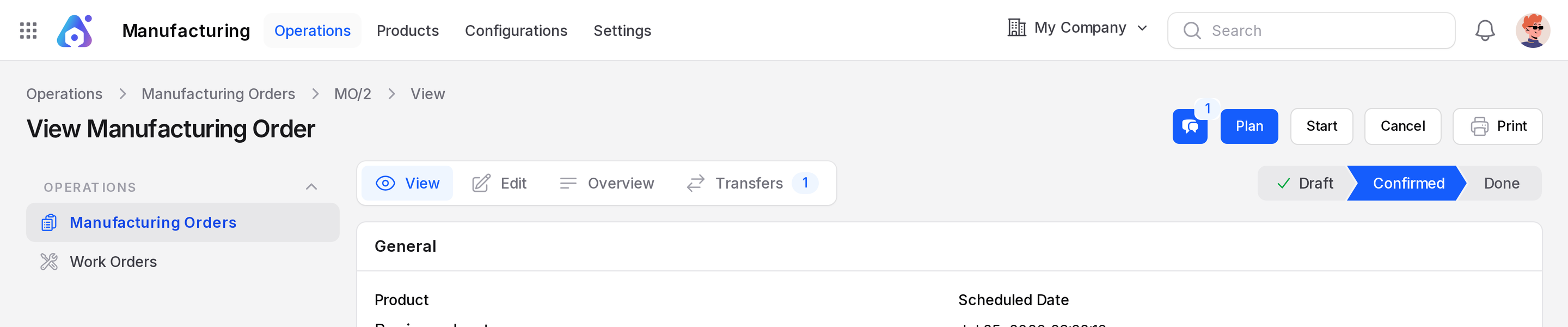
States
| State | Meaning |
|---|---|
| Draft | The order is saved. Nothing is reserved yet. |
| Confirmed | The order is accepted and its transfers exist. |
| In Progress | Work has started. |
| To Close | Work is finished and the order waits to be closed. |
| Done | Components are consumed and the finished product exists. |
| Cancelled | The order is stopped. |
Readiness
The MO Readiness column tells you if a confirmed order can start.
| Value | Meaning |
|---|---|
| Waiting | Components are not all available. |
| Ready | The order can start. |
| Waiting another operation | A step must finish before this one can start. |
Buttons by state
| State | Buttons |
|---|---|
| Draft | Confirm |
| Confirmed | Produce All, Plan, Start, Cancel, Print |
| Confirmed and planned | Unplan is added |
| In Progress | Produce All or Produce, Cancel, Print |
| To Close | Produce All or Produce, Cancel, Print |
| Done | No action buttons |
| Cancelled | No action buttons |
Produce replaces Produce All when Quantity Producing differs from the order quantity.
Where to go next
| Step | Page |
|---|---|
| Create, confirm, start, cancel and print | Manufacturing orders |
| Schedule work orders on work centers | Plan and schedule |
| Run, pause and finish each step | Work orders |
| Consume components and make the product | Produce and consume |
| Track lots and serial numbers | Lots and serial numbers |
INFO
The warehouse step setting decides which transfers appear. See One-step, two-step and three-step manufacturing.