

Lead scoring
Lead scoring gives each open lead and opportunity a probability of winning. Aureus works it out from your own history of won and lost deals. You can then focus on the records with the best chance first.
In simple words: Aureus learns from your past wins and losses to guess which new records will win.
The score is a percentage. It updates when a record changes and when you rebuild the scoring from the settings page.
About the example
The Sharma Textiles lead is in the first stage, has a valid email and phone, comes from the Newsletter source and carries the tag Software. You check what Aureus considers for it.
Settings
- Go to
CRM → Settings → Manage Lead Scoring. - Choose the details Aureus should consider.
- Set a start date if you want to ignore old records.
- Click Save changes, or click Update Scoring Probabilities.
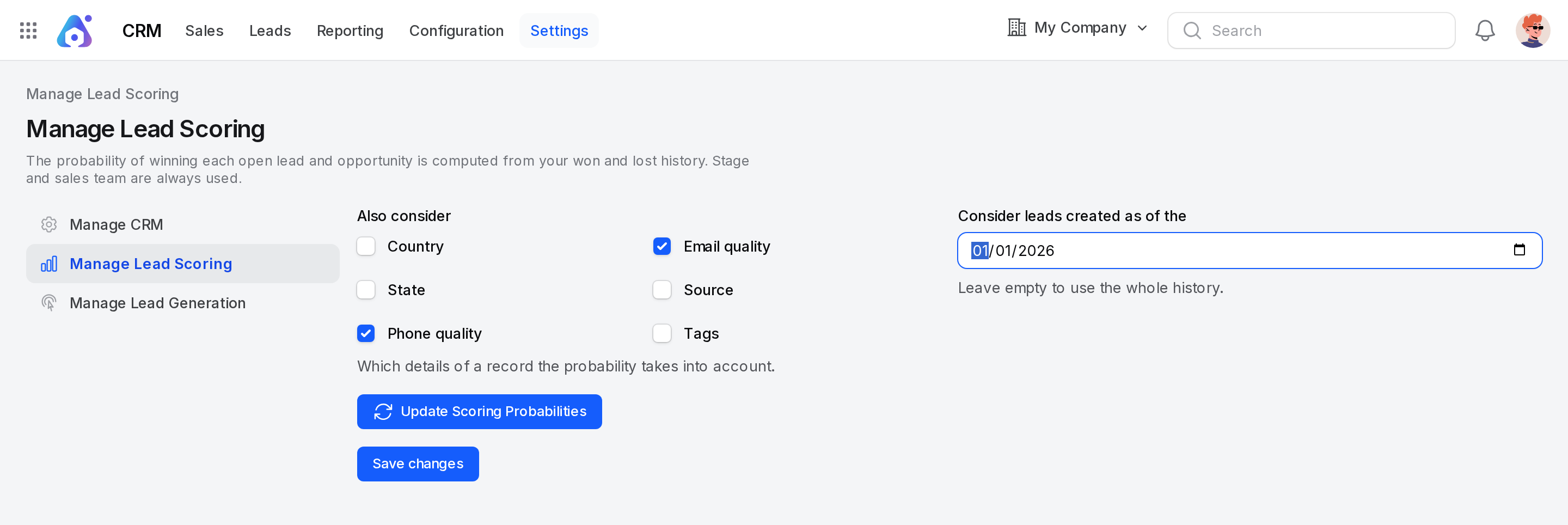
The page text reads: the probability of winning each open lead and opportunity is computed from your won and lost history. Stage and sales team are always used.
- Also consider: Tick the details to add. The helper text reads Which details of a record the probability takes into account.
- Country: Where the record is located.
- State: The state of the record.
- Phone quality: Whether the phone number looks valid (at least 7 digits).
- Email quality: Whether the email address looks valid.
- Source: Where the record came from.
- Tags: The tags on the record.
- Consider leads created as of the: A date, not later than today. Aureus learns only from records created on or after it. Leave it empty to use the whole history.
Example: Tick Country, Email quality and Source. Leave the date empty.
The stage and the sales team are always used. They have no tick box.
Update the scores
Update Scoring Probabilities saves your choices, learns again from the won and lost history, and recomputes every open record.
- Click Update Scoring Probabilities.
- Read the message and confirm.
Aureus then shows Probabilities updated for N open record(s). Clicking Save changes does the same when you changed the details or the date.
How it works
Aureus counts, for each sales team, how often each detail appeared on won records and on lost records.
- A won record is one in a stage marked as won.
- A lost record is one you marked as lost or deleted.
- For each detail on an open record, such as its stage or its country, Aureus checks if that detail is more common on won or on lost records. It combines all the details into one percentage.
- If the team has no history, Aureus uses the history of all teams together.
- The result never goes above 99.99 %. Only a won stage gives 100 %.
Example: In the Qualified stage with your Sales team, past records were often won. A valid email also helps. The probability goes up. If similar records were mostly lost, it goes down.
See the reasons
Open the lead or opportunity and click the information icon next to Probability. The window Probability details shows:
- Computed probability: The value Aureus calculated. If there is not enough history, you see Not enough won and lost history yet to compute a probability.
- Sales team: The team whose history was used.
If you typed the probability by hand, the window says so and still shows the computed value.
Automatic and manual probability
- With the field empty, the probability is Automatic. Aureus updates it when the record changes.
- If you type your own number, it stays. The details window then adds the note that you set it by hand.
- Click Use computed probability to go back to the automatic value.
- Typing the same number as the computed one counts as automatic.
Behind the scenes
- The stage, sales team, country, state, source, email, phone and probability are watched. Changing one rescores the record.
- Marking a record as lost, deleting it or restoring it triggers a new learning pass.
- Moving an opportunity to a won stage sets its probability to 100 %. Moving it out of that stage makes it automatic again.
- Reports show the probability next to the expected revenue. See Forecast and Pipeline analysis.
TIP
Run Update Scoring Probabilities after you close many deals. More history gives better scores.
WARNING
Scoring needs history. With few won and lost records, the numbers are not reliable.