

Register sessions
A session is one working period of a register, from the moment you open the cash drawer to the moment you count it and close. Every order, payment and cash movement belongs to a session. Sessions keep your daily cash and sales apart, so you can check each shift on its own.
In simple words: Open the register to start the day, sell, then close the session to count the cash and post the sales to accounting.
A register can have only one live session at a time. The next session starts only after the last one is closed.
The session life cycle
Each session moves through these statuses.
- Opening Control: The session exists, but nobody has confirmed the opening cash yet. You confirm it in the Opening Control window.
- In Progress: The register is open. You can sell, take refunds and record cash in and out.
- Closing Control: The session has stopped selling and waits for the final cash count.
- Closed & Posted: The cash is counted and the sales are posted to accounting. The session is final.
The flow is: open the register, sell, record cash in and out, close the session, then review the numbers in reports.
The Sessions list
Go to Point of Sale → Orders → Sessions. This list shows every session of every register.
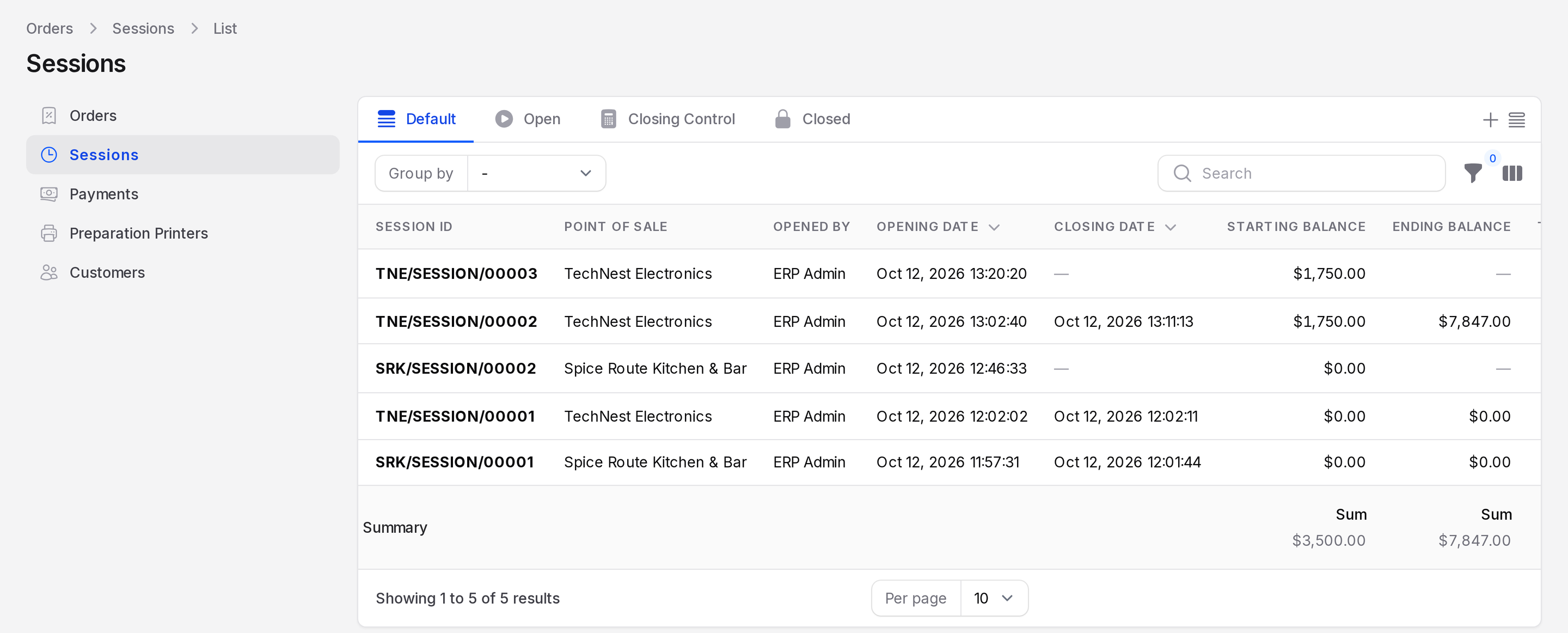
Tabs
- Default: All sessions.
- Open: Sessions that are in progress.
- Closing Control: Sessions waiting for the final count.
- Closed: Sessions that are finished and posted.
Columns
The list shows Session ID, Point of Sale, Opened By, Opening Date, Closing Date, Starting Balance, Ending Balance, Theoretical Closing Balance and Status. Some columns are hidden at first. Use the column toggle to show more.
A session ID looks like TNE/SESSION/00002. The first part is the Short Code of the register. See Set up a register.
Row actions
- View: Opens the session with its orders and payments.
- Cash In/Out: Records money put into or taken out of the drawer. See Cash in and out.
- Close Session: Counts the drawer and closes the session. See Close a session.
- Open Session: Shows only on a session in Opening Control. It confirms the opening cash and starts the session.
Use Group by or the filters to find a session by register or status.
Example
TechNest Electronics opens its retail register with 1,750 in the drawer. The session is TNE/SESSION/00002. The team sells two orders, takes a refund and pays a courier 500 from the drawer. At closing they count 7,847, which matches the expected balance, so the session closes with no difference.
Pages in this group
TIP
Close the session every day. A session left open for many days is flagged on the Dashboard so you can find it.