

Aged receivable and aged payable
These two reports show the open amounts by age. Aged Receivable lists what customers still owe you. Aged Payable lists what you still owe vendors. Use them to chase late payers and to plan which bills to pay first.
In simple words: Open invoices sorted by how late they are. The older the amount, the more urgent it is.
They are in the Accounting app only:
Accounting → Reporting → Aged ReceivableAccounting → Reporting → Aged Payable
Both reports work the same way. Only the accounts differ: receivable for customers, payable for vendors.
Filters
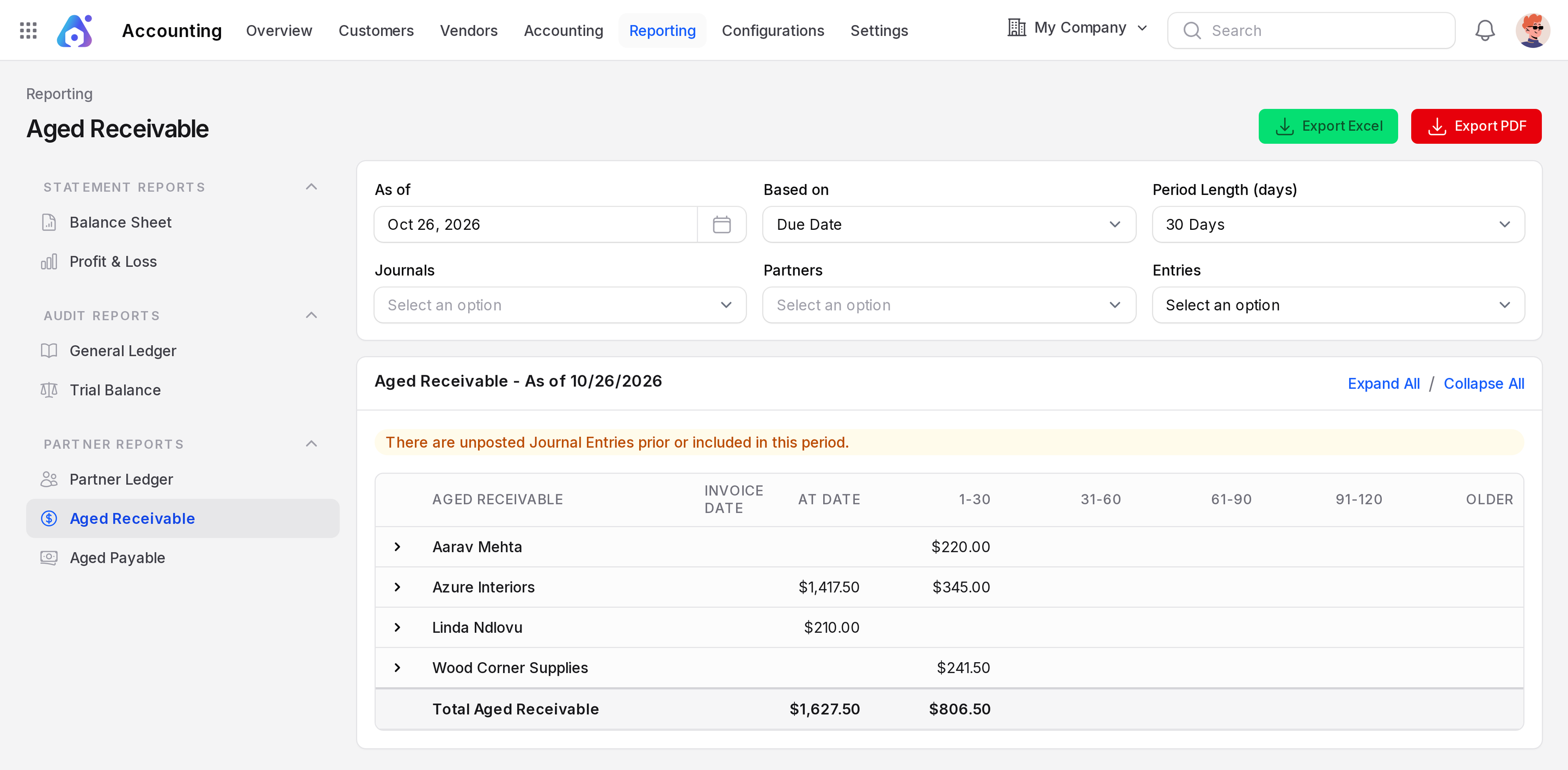
- As of: The date of the report. It starts as today.
- Based on: Due Date or Invoice Date. It decides which date Aureus uses to measure the age.
- Period Length (days): 30 Days, 60 Days or 90 Days. It is the width of each column.
- Journals: Limit the report to chosen journals.
- Partners: Limit the report to chosen partners.
- Entries: Posted Entries (default) or All Entries. The second one includes drafts.
WARNING
A yellow message "There are unposted Journal Entries prior or included in this period." means some entries are still drafts. The report shows posted entries only, so confirm them or choose All Entries.
How to read it
The columns are Aged Receivable (the partner), Invoice Date, At Date, 1-30, 31-60, 61-90, 91-120, Older and Total. The numbers shown depend on the period length.
- At Date: Not late yet. The due date is after the As of date.
- 1-30: Late by 1 to 30 days (with a 30 day period).
- 31-60, 61-90, 91-120: Later buckets.
- Older: Later than four periods.
- Total: All open amounts of the partner.
Click a partner row or use Expand All to see each open invoice. Collapse All closes the rows. The last row, Total Aged Receivable, sums each column.
Example. As of Oct 12, 2026 the report shows one partner.
| Partner | At Date | Total |
|---|---|---|
| Azure Interiors | 1,207.50 | 1,207.50 |
Invoice INV/2026/1 is not late yet, so the amount sits in At Date. If its due date were Sep 1, 2026, it would sit in 31-60.
Aged Payable on the same date shows the message "No receivables found for the selected criteria." The only bill is paid.
Export
Click Export Excel or Export PDF. Expand the partners first. The export includes the invoice lines of the partners you opened.
Common questions
What is the difference between Due Date and Invoice Date?Due Date measures lateness. Invoice Date measures how old the invoice is.
Why is a paid invoice missing? Only open amounts are listed.
Why do the numbers differ from the Partner Ledger? The aged reports list open amounts only. The partner ledger shows all movements.