

Sales details
The Sales details report gives a full picture of a period in one screen. It shows the order totals, how customers paid, the taxes collected and every product sold. Use it at the end of a day or week, or when your accountant asks what the registers sold.
In simple words: Pick a date range and a register. The page tells you what was sold, how it was paid and how much tax it carried.
Open the report
Go to Point of Sale → Reporting → Sales Details.
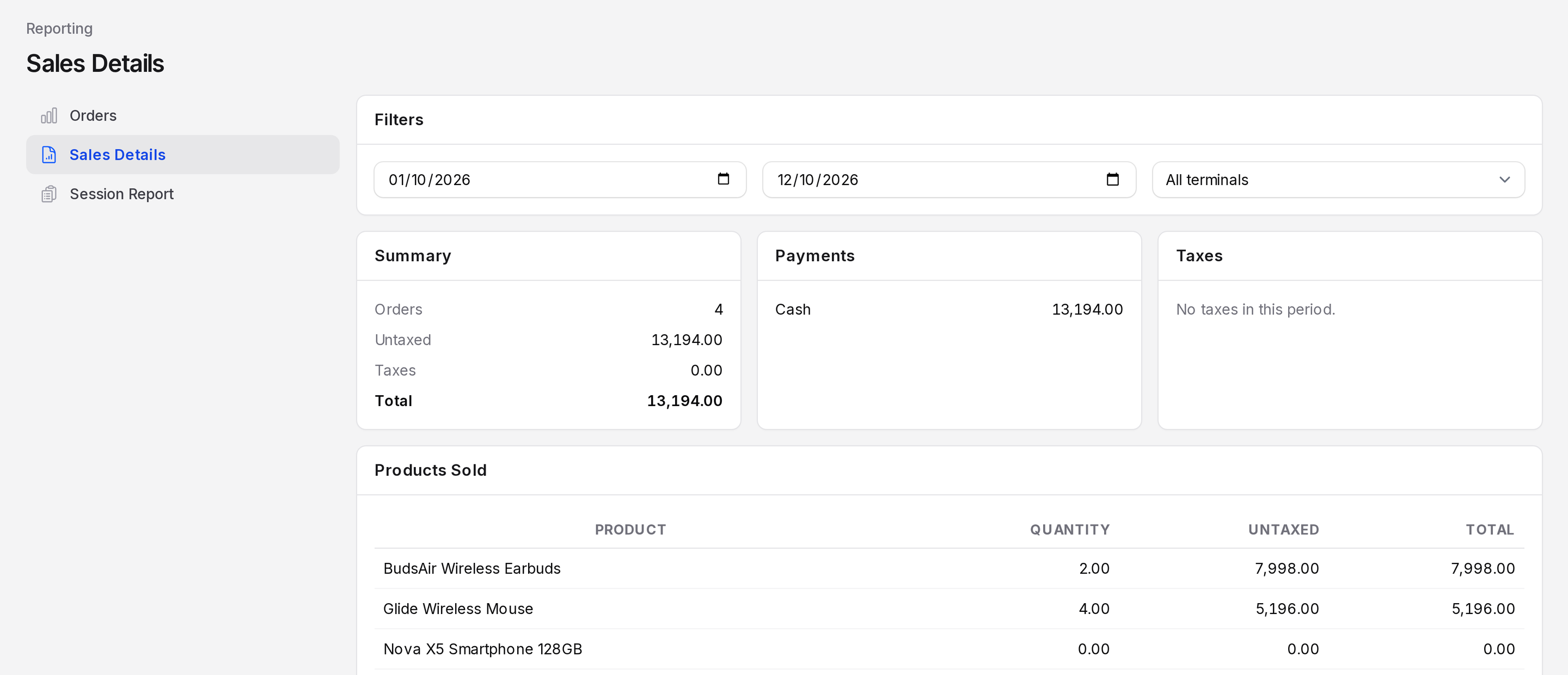
Set the filters
- Start date: The first day to include. It starts on the first day of the current month.
- End date: The last day to include. It starts on today.
- Terminal: Choose All terminals or one register.

The report refreshes after each change.
Read the sections
Summary
- Orders: The number of settled orders.
- Untaxed: The total before tax.
- Taxes: The tax total.
- Total: The grand total of those orders.
Payments
One line for each payment method, such as Cash, with the amount received. Use it to compare with what is in the drawer or on the card terminal.
Taxes
One line for each tax, with the tax amount. When your products carry no tax, the section reads No taxes in this period.
Products Sold
A table with these columns, sorted by the largest total first:
- Product: The product name.
- Quantity: The units sold. Returned units are subtracted.
- Untaxed: The sales amount before tax.
- Total: The sales amount with tax.
Worked example
Use TechNest Electronics from 1 to 12 October 2026.
Summary: 3 orders, untaxed 6,597.00, taxes 0.00, total 6,597.00.
Payments:
| Method | Amount |
|---|---|
| Cash | 6,597.00 |
Products Sold:
| Product | Quantity | Untaxed | Total |
|---|---|---|---|
| BudsAir Wireless Earbuds | 1.00 | 3,999.00 | 3,999.00 |
| Glide Wireless Mouse | 2.00 | 2,598.00 | 2,598.00 |
| Nova X5 Smartphone 128GB | 0.00 | 0.00 | 0.00 |
The Nova X5 smartphone was sold once and returned once, so it nets to zero. It still shows in the list.
TIP
The cash amount is lower than the 7,000.00 the customer handed over for TNE/00001. The 403.00 change went back to the customer, so only the order value stays.