

Invoice sequence
Every invoice, credit note, bill and payment gets a number. Aureus builds that number from a sequence, so two documents never share the same number. This page explains how the number looks, when it appears and how you can see or change the rule.
In simple words: A sequence is a numbering machine. Each journal has its own, so invoices and bills count separately.
How a number is built
The usual format is:
{journal code}/{year}/{number}
- Journal code: The short code of the journal, such as INV for Customer Invoices.
- Year: The year of the document date.
- Number: A counter with 5 digits. Aureus adds zeros on the left.
The counter starts again at 1 every year. So the first invoice of 2027 is INV/2027/00001.
Example: The third invoice of 2026 in the Customer Invoices journal is INV/2026/00003.
INFO
Older records can show a shorter number, such as INV/2026/1. Both forms are valid. New documents use 5 digits.
When the number appears
Aureus gives the number when the document is created, not when you confirm it. A draft invoice already shows its number in the list, for example INV/2026/00003. The number does not change when you confirm, cancel or reset the document to draft.
Prefixes for credit notes and payments
A journal can keep separate counters for credit notes and payments. Two toggles on the journal control this.
- Dedicated Credit Note Sequence: When on, credit notes and refunds get the prefix R. A credit note in the INV journal is
RINV/2026/00004. A vendor refund in the BILL journal isRBILL/2026/00005. - Dedicated Payment Sequence: When on, payments get the prefix P. A payment in the BANK journal is
PBANK/2026/3.
When a toggle is off, the document uses the normal counter of the journal.
To change a toggle, go to Accounting → Configurations → Accounting → Journals, open the journal and use the switches in the Accounting Information tab. The journal code is the field named Sort. See Journals.
See and change the rule
Sequences are stored in the Settings app.
- Go to
Settings → Sequences. - Find the row for your journal, for example Customer Invoices.
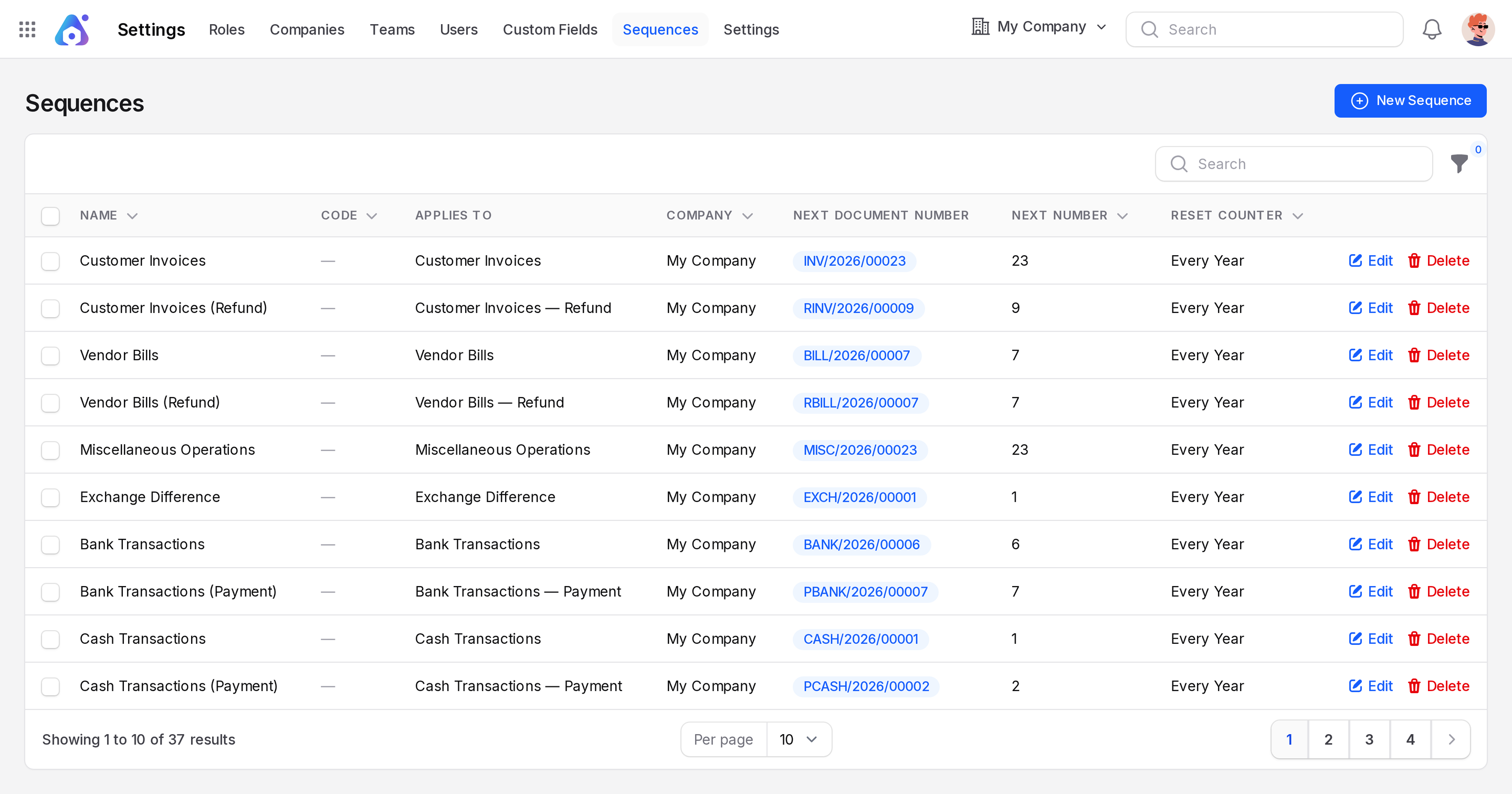
The list shows these columns:
- Name: The name of the sequence.
- Code: The technical identifier.
- Applies To: The journal. It can end with Refund or Payment.
- Company: The company it belongs to.
- Next Document Number: A preview of the next number, such as
INV/2026/00004. - Next Number: The counter value, such as 4.
- Reset Counter: When the counter restarts, such as Every Year.
To edit a row, click Edit, change the field and click Save changes. You cannot lower Next Number. You can only raise it. See Sequences for every field.
Worked example
Your Customer Invoices sequence shows Next Number 4.
- You create a new invoice. It gets
INV/2026/00004. The sequence now shows 5. - You confirm it. The number stays
INV/2026/00004. - You click Credit Note on it and the journal has a dedicated credit note sequence. The draft credit note gets the next number of the refund sequence, such as
RINV/2026/00004. - You raise Next Number to 100 in the sequence. The next invoice is
INV/2026/00100.
Good to know
- Do not try to reuse a number. Never type a number again that another document already uses.
- Raise Next Number only when you must skip ahead, for example to match an older system.