

Session report
The Session report shows the result of one session: how many orders it had, how customers paid and how the cash drawer looked. Use it when you close a session, or when you need to find out why the cash did not match.
In simple words: Choose a session. The page shows its sales, its payments and whether the drawer balanced.
Open the report
- Go to
Point of Sale → Reporting → Session Report. - Click the Session list. It shows the 50 latest sessions, newest first, in the form
TNE/SESSION/00002followed by the register name. - Pick a session.

Until you pick one, the page shows No session selected and the hint Pick a session to see its report.
Read the report
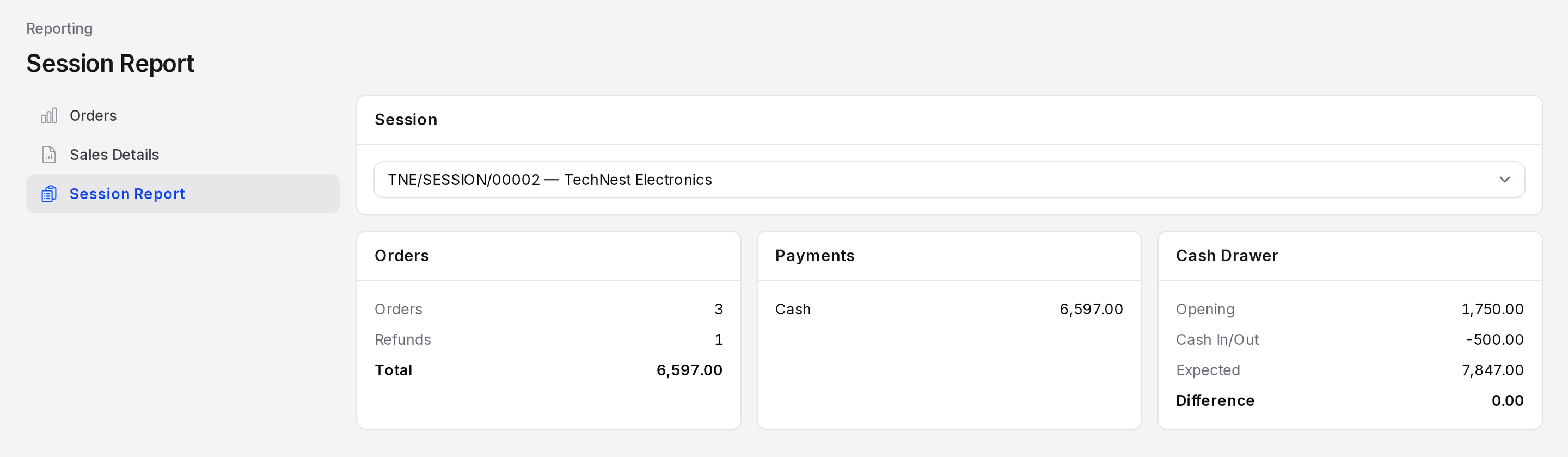
Orders
- Orders: The number of settled orders in the session.
- Refunds: How many of them are refunds (negative total).
- Total: The total of all those orders.
Payments
One line for each payment method used in the session, with the amount. When nothing was paid, the page reads No payments recorded.
Cash Drawer
- Opening: The cash you counted when you opened the register.
- Cash In/Out: The net of cash moves. A cash out shows as a negative number.
- Expected: The cash the drawer should hold. It is the opening amount plus cash payments plus the cash in/out net.
- Difference: Counted cash minus expected cash. It shows a dash until you close the session.
A difference of 0.00 means the drawer balanced. A negative number means cash is missing. A positive number means there is extra cash.
Worked example
Session TNE/SESSION/00002 of TechNest Electronics:
| Section | Line | Value |
|---|---|---|
| Orders | Orders | 3 |
| Orders | Refunds | 1 |
| Orders | Total | 6,597.00 |
| Payments | Cash | 6,597.00 |
| Cash Drawer | Opening | 1,750.00 |
| Cash Drawer | Cash In/Out | -500.00 |
| Cash Drawer | Expected | 7,847.00 |
| Cash Drawer | Difference | 0.00 |
The cashier opened with 1,750.00, took 6,597.00 in net cash and paid out 500.00 for a courier ("Paid courier for same day delivery"). The drawer should hold 7,847.00. The closing count was 7,847.00, so the difference is 0.00.
Pick a session without sales, such as SRK/SESSION/00002, and every number is zero.
WARNING
A cash difference stays in the report after closing. Check the cash in and out entries of the session to find the reason.