

Set up accounting
Before a company can book invoices and payments, it needs a chart of accounts, journals, taxes and default settings. The Set up accounting step creates all of these for you in one click. You do it once per company.
In simple words: Click one button, confirm, and your company gets a ready-made set of accounts, journals, taxes and defaults.
When you see this step
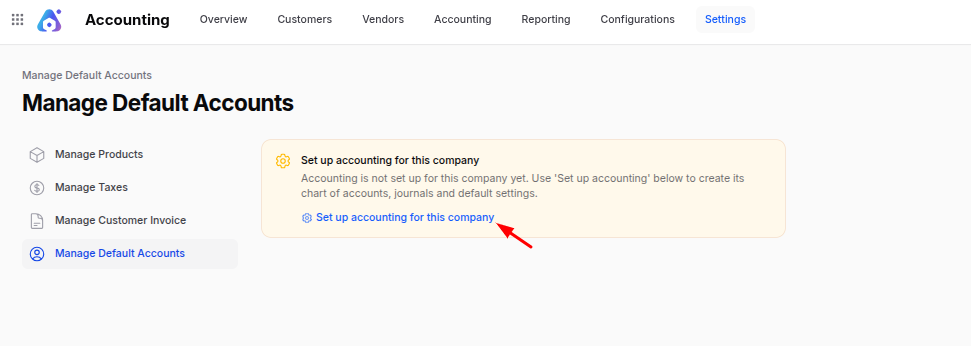
The step shows on the four pages under Accounting → Settings: Manage Products, Manage Taxes, Manage Customer Invoice and Manage Default Accounts. Two of them are affected in a clear way. Manage Taxes and Manage Default Accounts stay empty, with no Save changes button, until the company is set up. Instead you see a warning box with the heading Set up accounting for this company.
The box says: "Accounting is not set up for this company yet. Use 'Set up accounting' below to create its chart of accounts, journals and default settings."
INFO
Your first company is normally set up already, so you may never see this box. You see it when you add a new company.
How Aureus decides a company is set up
A company counts as set up when it has at least one Sale journal and one Purchase journal. If both exist, the box does not show and the pages work as normal.
Set up accounting
- Switch to the company you want to set up, using the company switcher at the top right.
- Go to
Accounting → Settings → Manage Default Accounts. The other settings pages work too. - In the warning box, click Set up accounting for this company.
- Aureus asks you to confirm. Click Confirm.
- A message Accounting set up appears: "Chart of accounts, journals and default settings were created for this company."
The page then reloads and shows the normal settings form.
What it creates
Aureus copies the accounting set-up of a template company into your company. A template company is the company that already holds your chart of accounts, journals and taxes. The template is the default company from your general settings (see Companies). If none is set, it is the first company created in the system.
The copy includes:
- Tax groups and taxes.
- The chart of accounts, including the parent and sub-account structure.
- Journals, such as Customer Invoices, Vendor Bills, Bank Transactions, Cash Transactions and Miscellaneous Operations. Journals do not keep the bank account of the template company, so you must link your own.
- Default settings: the default accounts, the exchange difference journal and the default sales and purchase taxes.
Amounts in currency fields are set to your company's own currency.
What it does not do
- It does not run if the company is already set up. Nothing is changed or duplicated.
- It does not run for the template company itself. That company needs its own accounting data in place.
- It does not copy invoices, bills, payments or other transactions.
- It does not create bank accounts. Add them under your journals. See Journals.
WARNING
Run the step before you create invoices or change settings for the new company. If the template company has no accounting data, there is nothing to copy.
What to do next
- Open the Chart of accounts and check the accounts.
- Open Journals and link the bank account to the Bank journal.
- Review Default accounts and Tax settings.