

Recurring plans
A recurring plan names the period that a recurring revenue covers, such as monthly or yearly. You pick a plan on an opportunity that sells a subscription or a service contract. Aureus uses the plan to work out the monthly amount.
In simple words: A recurring plan says how many months one recurring payment covers.
Settings
The Recurring Plans menu shows only when Recurring Revenue Plans is on. Go to CRM → Settings → Manage CRM, turn on Recurring Revenue Plans and click Save changes. See CRM settings.
Open CRM → Configuration → Members → Recurring Plans.
The recurring plan list
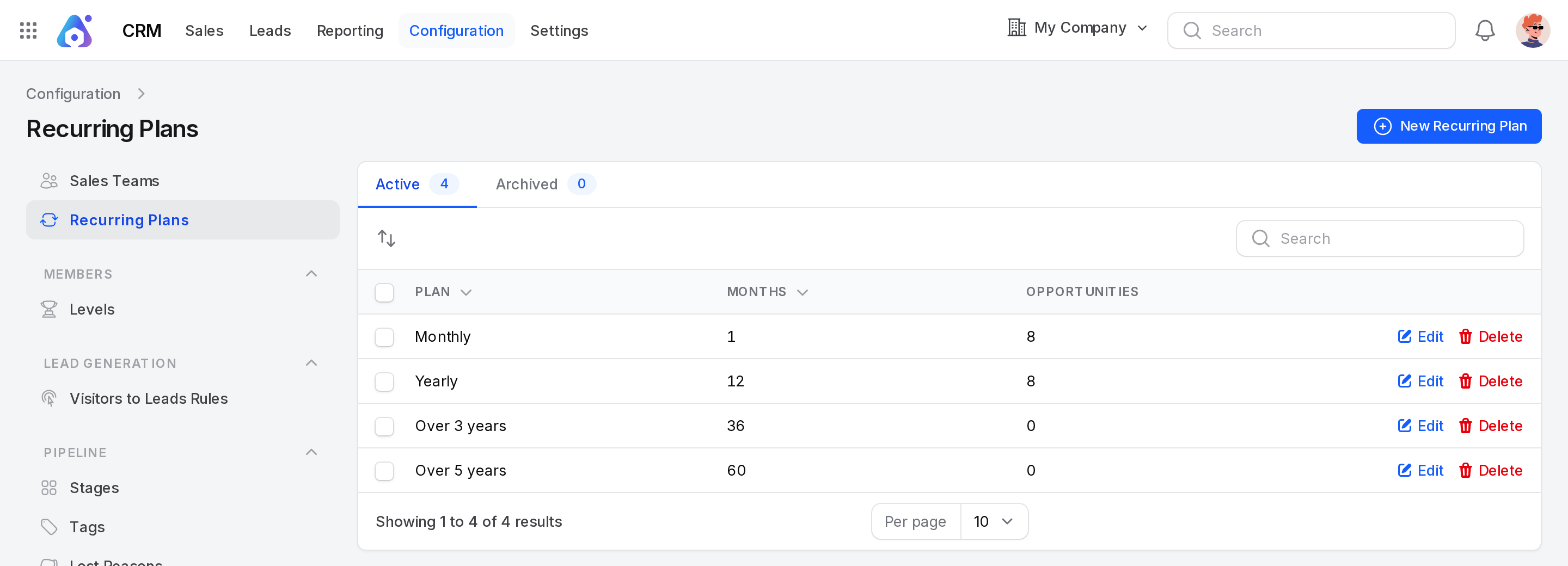
The default plans are Monthly (1 month), Yearly (12), Over 3 years (36) and Over 5 years (60).
Views (tabs)
- Active: Plans you can pick. The badge shows how many there are.
- Archived: Plans you deleted.
Columns
- Plan: The name of the plan.
- Months: How many months it covers.
- Opportunities: How many opportunities use the plan.
Example: In the dev data, Monthly and Yearly each have 8 opportunities. The two longer plans have none.
Search, order and export
- Type in the search box to find a plan.
- Click Plan or Months to sort.
- Drag a row handle to change the order in which plans are listed on the opportunity form.
- Select rows and use the bulk actions to export, delete, restore or delete for good.
Create a recurring plan
- Go to
CRM → Configuration → Members → Recurring Plans. - Click New Recurring Plan.
- Fill in the form.
- Click Create.
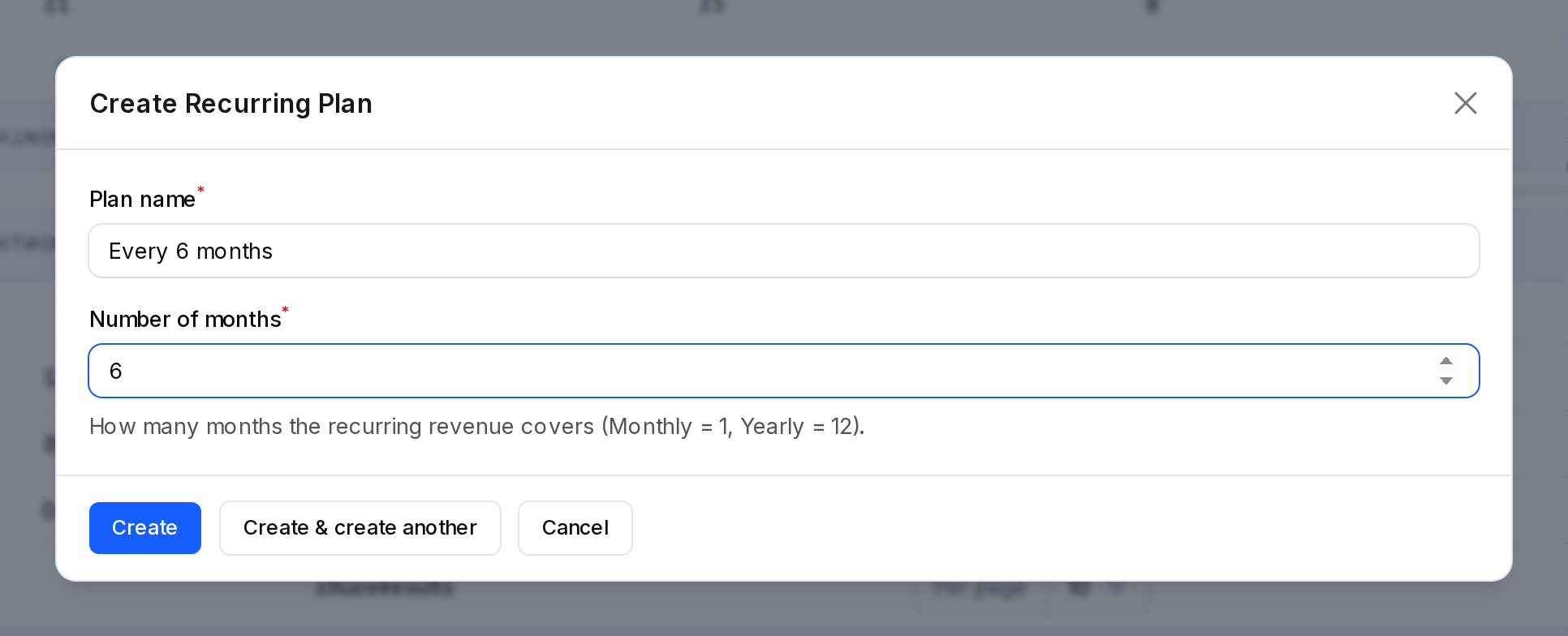
- Plan name: The name your team sees. Required. Up to 255 characters. The hint reads
e.g. Monthly. - Number of months: How many months the recurring revenue covers. Required. A whole number of at least 1. It starts at 1. Monthly is 1 and Yearly is 12.
Example: Name Every 6 months and enter 6 months. A notice says Recurring plan created.
Actions and statuses
| Action | Where | What it does |
|---|---|---|
| Edit | Active tab | Changes the name or months. A notice says Recurring plan updated. |
| Delete | Active tab | Moves the plan to Archived. |
| Restore | Archived tab | Brings the plan back. A notice says Recurring plan restored. |
| Delete (permanent) | Archived tab | Removes the plan for good. |
Use a plan on an opportunity
On an opportunity, two fields appear when the setting is on.
- Recurring Revenue: The amount of one recurring payment. It starts at 0.
- Recurring Plan: The plan that the payment covers. It is required as soon as Recurring Revenue is above 0.
Monthly recurring revenue is Recurring Revenue divided by the plan months. A revenue of 96,000 on Over 3 years, which is 36 months, is about 2,666.67 a month.
On the forecast, a card shows the recurring revenue and plan, for example + $18,000.00 Yearly. See Forecast.
Behind the scenes
- An opportunity keeps a link to its plan, even if you archive the plan later.
- Editing the months of a plan changes the monthly amount on every opportunity that uses it.
- If you turn the setting off, the plans and the saved values stay. Only the menu and fields are hidden.