

Profit and loss
The profit and loss report compares what you earned with what you spent in a period. The result is your net profit. Use it every month to see if the business makes money.
In simple words: Revenue minus expenses equals profit. This report adds both up for the dates you choose.
It is in the Accounting app only: Accounting → Reporting → Profit & Loss.
Filters
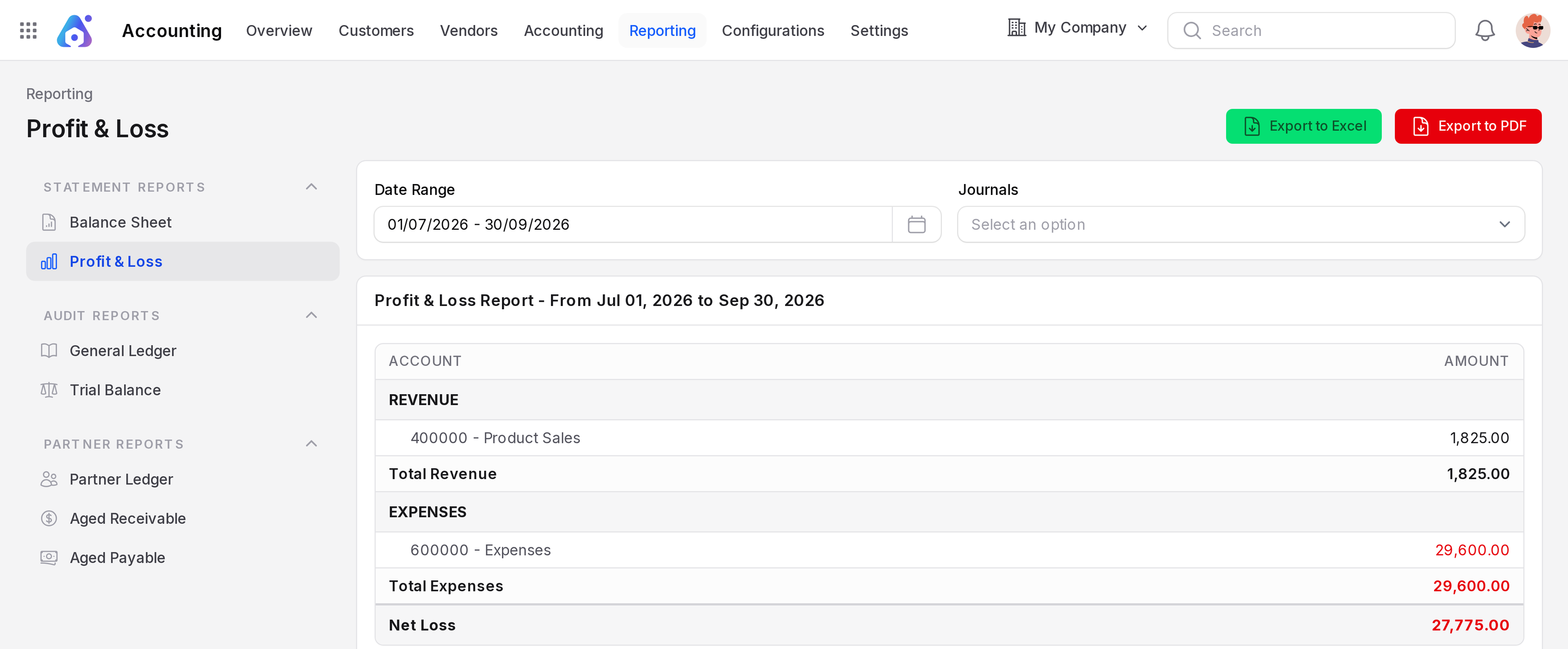
- Date Range: The period to measure. Only entries dated inside the range count.
- Journals: Limit the report to chosen journals.
The default range is the current month. The sample data is dated July 2026, so choose Last Quarter in the Date Range (01/07/2026 - 30/09/2026). With the default range the report says "No revenue accounts with transactions in this period" and the net result is 0.00.
How to read it
The report has two columns: Account and Amount.
- REVENUE: Income accounts, such as 400000 Product Sales. The block ends with a total.
- EXPENSES: Expense accounts, such as 600000 Expenses. The block ends with a total.
- Net Profit or Net Loss: Revenue total minus expenses total. The label changes to Net Loss when expenses are higher.
Example for July 2026, taken from the posted entries:
| Block | Account | Amount |
|---|---|---|
| Revenue | 400000 Product Sales | 1,825.00 |
| Expenses | 600000 Expenses | 29,600.00 |
| Net Loss | 27,775.00 |
Revenue of $1,825.00 comes from invoices INV/2026/1 and INV/2026/2 before tax ($1,050.00 and $775.00). Expenses of $29,600.00 come from bill BILL/2026/4 before tax.
The red Net Loss line means a loss. This is the same number as the Current Year Unallocated Earnings on the Balance sheet.
Export
Click Export to Excel or Export to PDF to download the report.
Common questions
Why is the tax not in the report? Tax is not revenue or expense. It sits in the tax accounts on the balance sheet.
Why does the paid bill still count? The report counts the cost when you post the bill, not when you pay it.
Why is my report all zero? No posted entries fall in the range. Change the Date Range.