

Manufacturing Settings
The Manufacturing Settings page allows you to enable or disable the core capabilities of the Manufacturing module based on your production workflow.
These options decide how production is planned, executed, and tracked across your shop floor — from simple manufacturing orders to advanced multi-step routings with work orders and dependencies.
Manage Operations
Navigate to Settings → Manufacturing → Manage Operations as shown below.
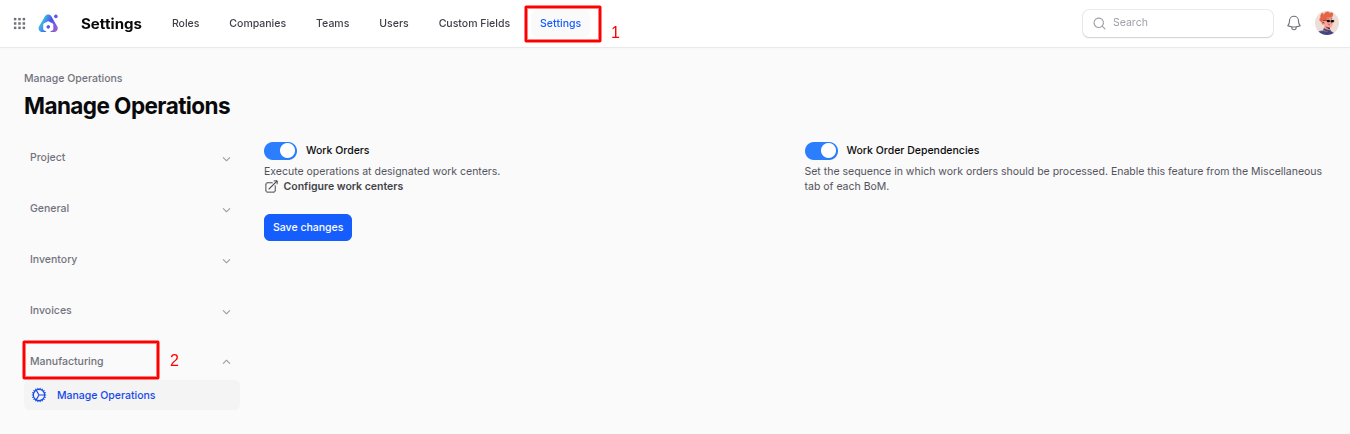
Work Orders: Enable this option to execute manufacturing operations at designated Work Centers. Turning this on activates the Work Orders menu, so each step of a manufacturing order (cutting, assembly, packaging, etc.) can be scheduled, started, paused, and validated individually with real-time tracking. Once enabled, a quick link
Configure work centersappears so you can set up your shop floor right away.Work Order Dependencies: Enable this to define the sequence in which work orders must be processed. With dependencies turned on, a work order will only become ready once all its predecessors are completed. This is configured per Bill of Material in the Miscellaneous tab. Enabling this option automatically enables Work Orders above.
Save Changes: Click to apply your operation settings.
Use Case
Enabling Work Orders is essential for businesses with multi-step production processes that need shop-floor scheduling, capacity planning, and operator tracking.
Add Work Order Dependencies when certain operations must wait for others to finish (e.g. Painting can only start after Assembly is complete).
Summary
The Manufacturing Settings area lets you customize:
- Whether production is executed as a single manufacturing order or split into detailed work orders.
- Whether work order sequences/dependencies are enforced.
- Whether by-products are tracked alongside finished goods.
- The default lead time used to plan upcoming production.
Enable only the capabilities your operations need to keep the manufacturing workflow lean and efficient.
Next step: Once settings are in place, follow the setup order in the Manufacturing Orders guide — it includes the complete start-to-end flow chart.