

Operations
In the Manufacturing module, an Operation represents a single step in the production process — for example Cutting, Welding, Assembly, Painting, or Packaging.
Operations are linked to Work Centers (where they run) and Bills of Material (the products that require them). Together, they form the routing that turns raw components into finished goods.
Use Case:
Define every distinct task on your shop floor as an Operation so that when a Manufacturing Order is launched, the system automatically generates the right Work Orders at the right Work Centers with the correct expected duration and worksheet instructions.
In simple words: An Operation is one named task in your production process — like "Cutting" or "Painting". Operations are attached to a Bill of Material and tell the system which step happens where.
Operations are only available when Work Orders is enabled in Manufacturing Settings.
Steps to Create a New Operation
Navigate to
Manufacturing → Configurations → Operationsas shown below: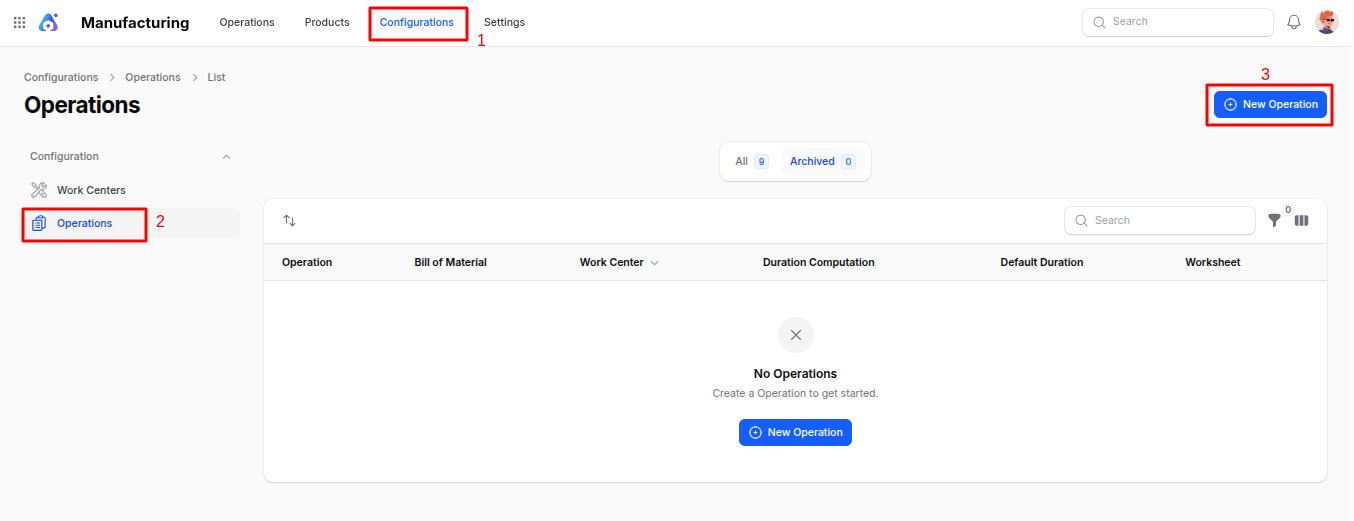
Fill in the following details:
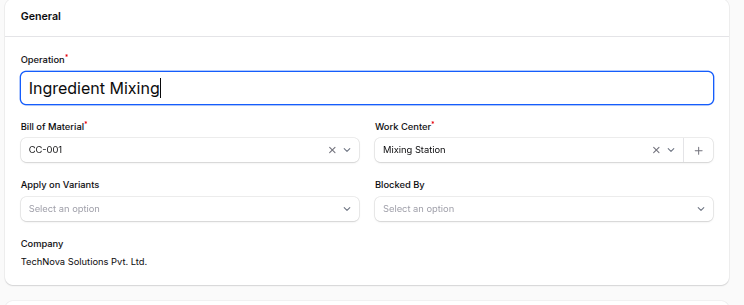
General Section
- Operation: The name of the operation (e.g.
Cutting,Assembly,Quality Check). This appears on work orders and worksheets. - Bill of Material: Select the Bill of Material this operation belongs to. The operation will be included whenever this BoM is produced.
- Work Center: Choose the Work Center where this operation must be performed. The work order will be routed there automatically.
- Apply on Variants: Restrict this operation to specific product variants (e.g. only the Large size needs the Reinforcement step). Leave empty to apply to all variants.
- Company: The company that owns this operation record.
- Blocked By: Select other operations that must finish before this one can start. Used to enforce sequence on the shop floor (e.g. Painting is blocked by Assembly). Requires Work Order Dependencies to be enabled in settings.
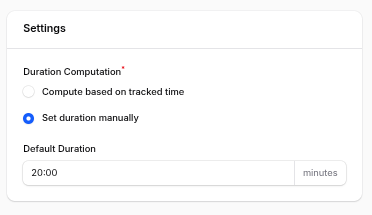
Settings Section
- Duration Computation: Choose how the system estimates the time for this operation.
- Set Duration Manually – Always use the Default Duration you enter below.
- Compute Based on Tracked Time – Use the average real duration of the last N completed work orders for automatic learning.
- Based On (last … work orders): Visible only when Compute Based on Tracked Time is selected. Enter how many recent work orders should be averaged to predict the next duration (e.g. last
10work orders). - Default Duration (minutes): The fallback expected duration of the operation. Used directly when the time mode is manual, and used as the initial value before enough data is collected in automatic mode.
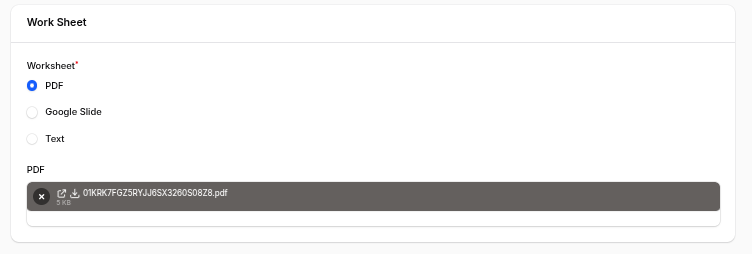
Work Sheet Section
Worksheets give shop-floor operators clear instructions for completing the operation.
- Worksheet: Select the format of the work instruction —
PDF,Google Slide, orText. - PDF: Visible when PDF is selected. Upload the PDF document operators should follow.
- Google Slide: Visible when Google Slide is selected. Paste the public Google Slides link.
- Description: Free-text instructions describing how the operation must be performed. Visible when the Text worksheet type is used.
- Operation: The name of the operation (e.g.
Action Buttons:
- Create – Save and open the operation record.
- Create & Create Another – Save and open a blank form to add another operation.
- Cancel – Discard and return to the list.
Operation View Page
After creation, you are redirected to the Operation View Page which summarizes all the configured information.
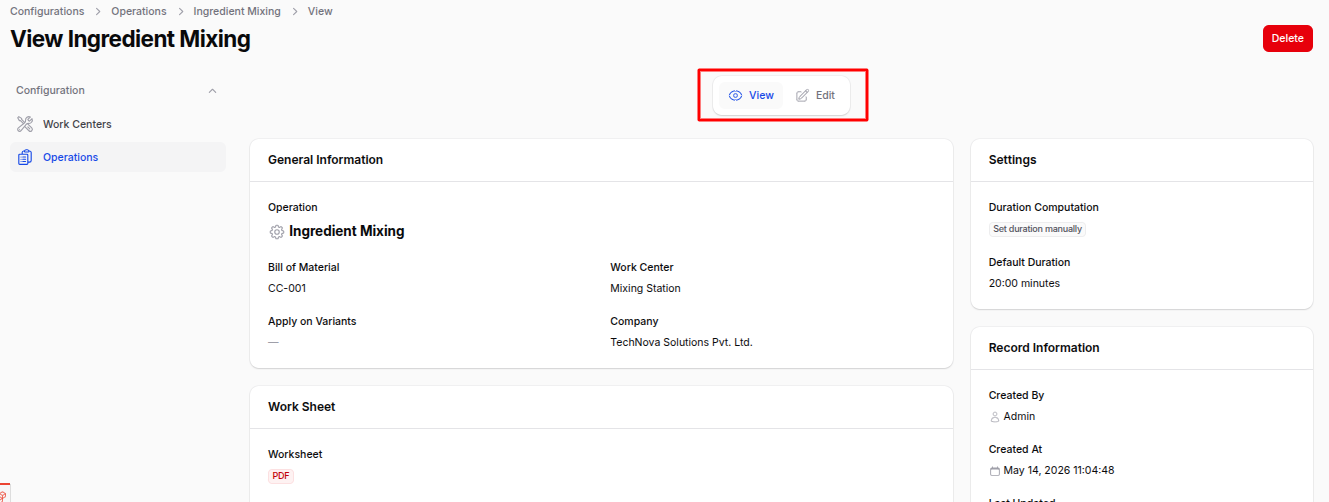
- View: Review all operation details, settings, and worksheet.
- Edit: Modify any saved field.
- Delete / Archive: Remove or archive the operation. Archived operations remain in the database but no longer appear in selection lists.
List View — Filters & Actions
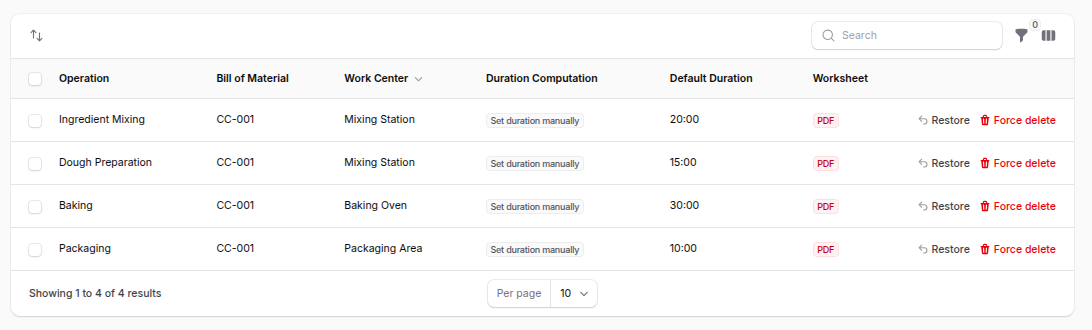
The Operations list view shows every configured operation with the following columns: Operation, Bill of Material, Work Center, Duration Computation, Default Duration, and Worksheet.
You can:
- Filter by: Work Center, Duration Computation, or Worksheet type.
- Bulk Actions: Archive, restore, or permanently delete selected operations.
Summary
Operations are the building blocks of your production routing. A well-defined set of operations gives you:
- Predictable scheduling at the right Work Centers.
- Clear worksheets for operators.
- Realistic duration estimates that improve over time.
- Sequence control across the shop floor via dependencies.
Next step: Add your operations inside a Bill of Material. They will then turn into Work Orders whenever a Manufacturing Order is created.